
singpass
142
A Singapore Government Agency Website
Back to home
Updated by SINGPASS
How do I enable browser storage if I see “Browser Storage is disabled”?
If you see “Browser Storage is disabled”, your browser may be blocking the website data needed for Singpass login. Try the steps below, then reload the page and try again.
Desktop
Google Chrome
Open Settings
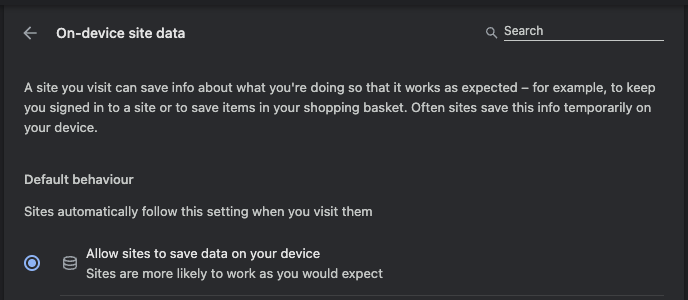
Go to Privacy and security > Site settings > Additional content settings > On-device site data
Make sure Allow sites to save data on your device is selected
Ensure there are no Customised behaviours that include singpass.gov.sg domain
Reload the page
Microsoft Edge
Open Settings
Go to Privacy, search, and services > Cookies
Make sure Allow sites to save and read cookie data is selected
Go to Privacy, search, and services > Site permissions > All permission > On-device site data (or search for “site data”)
Make sure Allow sites to save data on your device is selected
Ensure there are no Customised behaviours that include singpass.gov.sg domain
Reload the page

Safari
Open Settings
Ensure that Block all cookies is unchecked
Reload the page
Firefox
Open Settings
Keep Enhanced Tracking Protection on Standard
Go to Privacy and security > Browsing data > Manage exceptions
Ensure that singpass.gov.sg is not in the list
Save changes and reload the page
Mobile
Google Chrome on Android
Open Settings
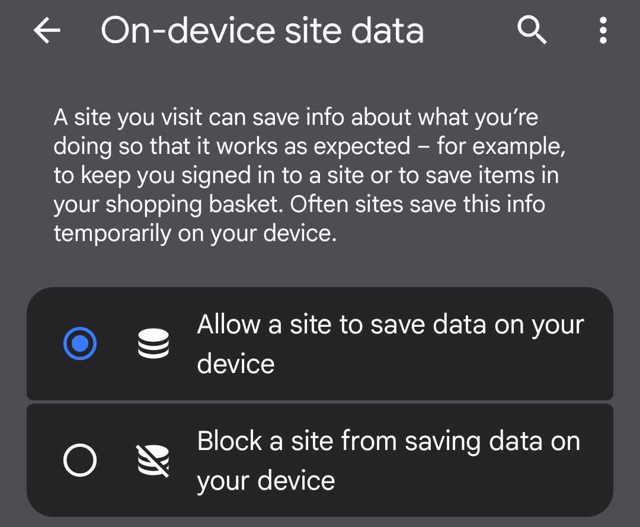
Go to Site settings > On-device site data
Make sure Allow sites to save data on your device is turned on
Reload the page
Samsung Browser on Android
Open Settings
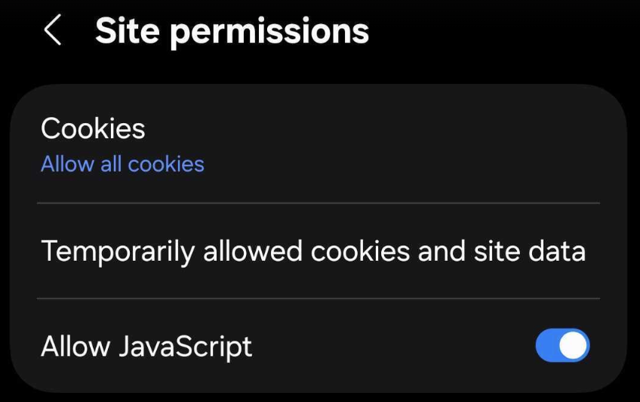
Go to Sites and downloads > Site permissions
Make sure Allow all cookies are selected
Firefox
Open Settings
Keep Enhanced Tracking Protection on Standard
Save changes and reload the page
Related questions


Need more help?
Describe your issues to us.