
singpass
3779
A Singapore Government Agency Website
Back to home
Updated by SINGPASS 7 found this helpful
What should I do if the QR code is unresponsive on Safari and I see a message asking me to download the Singpass app, even though it's already installed?
If you are using Safari and the Singpass QR code is not working, try the two methods below.
1. Open Singpass directly from the QR code
Step 1: Open Safari and go to any government digital service website (for example, IRAS or ICA).
Step 2: Go to the Singpass login page for that service.
Step 3: Long-press the QR code until a pop-up menu appears.
Step 4: Select "Open in Singpass" from the pop-up menu.
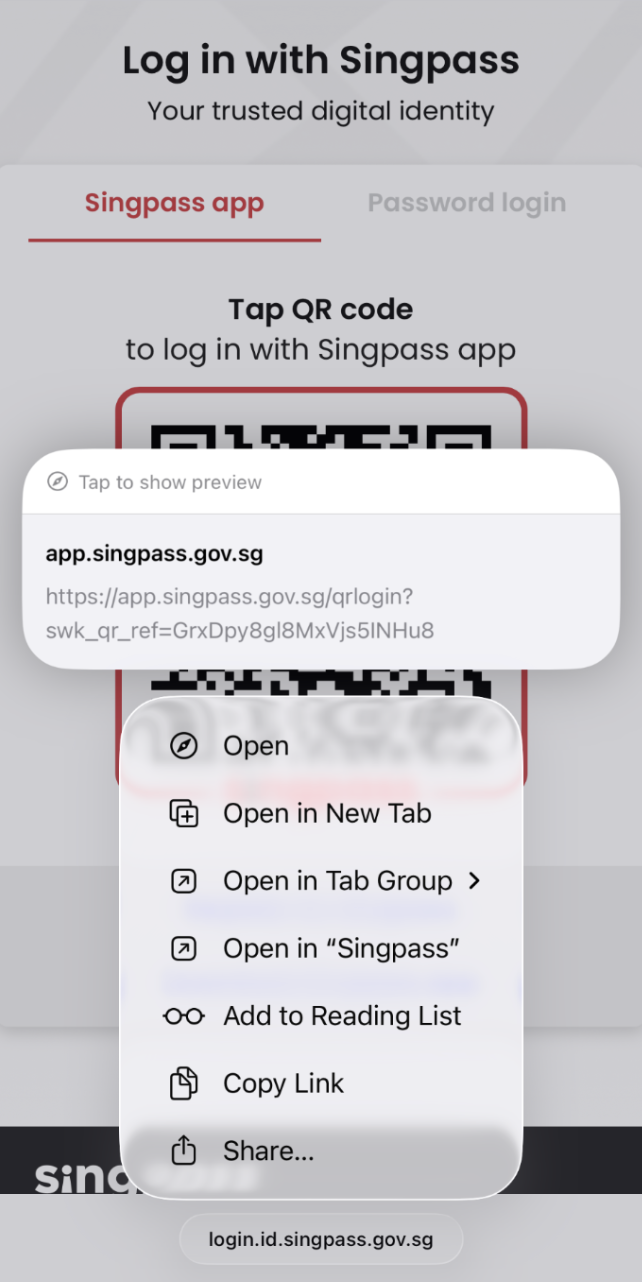
You should now be able to log in using your Singpass app.
2. Use the banner prompt to open Singpass
Step 1: Open Safari and go to any government digital service website (for example, IRAS or ICA).
Step 2: Go to the Singpass login page for that service.
Step 3: Long-press the QR code until a pop-up menu appears.
Step 4: Select "Open" — this is the first option in the pop-up menu.
Step 5: Tap "Open in the Singpass App" from the banner that appears at the top of your screen.
 You should now be able to log in using your Singpass app.
If the problem persists, contact the Singpass Helpdesk and an officer will be in touch to assist you.
Related questions


Need more help?
Describe your issues to us.