
scamshield
60
A Singapore Government Agency Website
Back to home
Updated by SCAMSHIELD 40 found this helpful
Scammers are targeting senior citizens with social activities that don't exist. Here's how you can spot one.
If you have any feedback for us regarding our Scam Trend Alerts (BETA) feature or about this article, please write to us here.
If you want to know how to set up scam alerts on your ScamShield app, please refer to this guide.
NOTE: This is a beta feature being rolled out to a small group of users first, so not everyone will see it yet.
Since 1 April 2026, at least eight senior citizens have lost a combined total of at least $69,000 to a scam that begins with a Facebook or TikTok advertisement for social activities. Scammers install malware on Android phones before impersonating government officials to demand money or valuables.
How this scam works
This scam operates in two phases. In the first, malware installs on your phone without your knowledge. In the second, scammers impersonating government officials demand money or valuables.
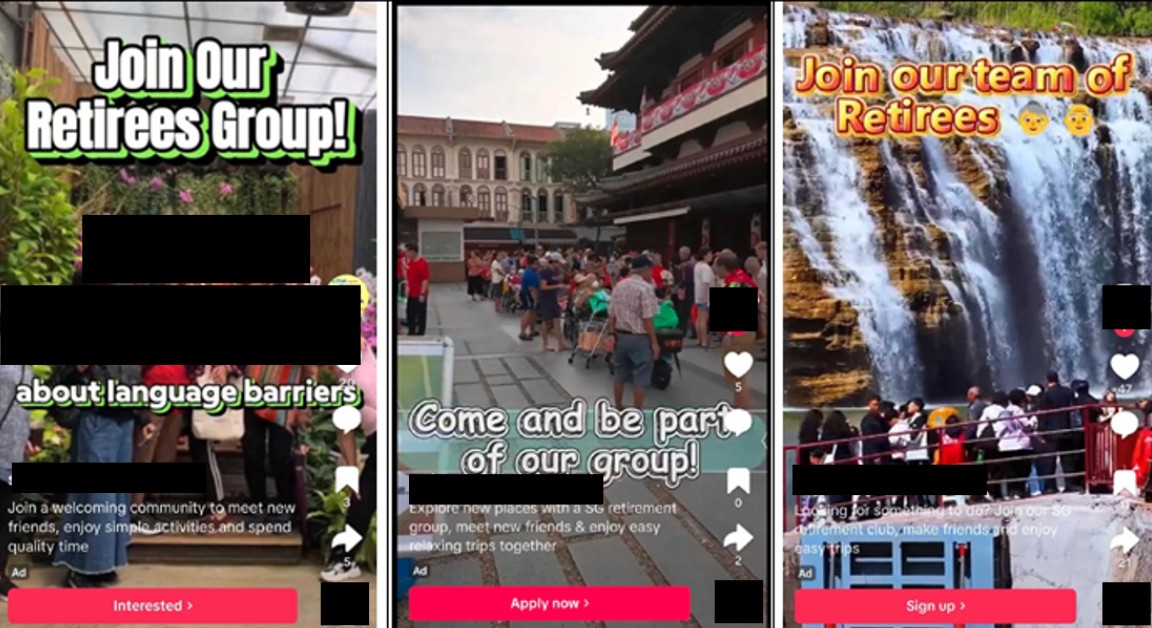
Step 1: You see an advertisement on social media promoting activities for senior citizens. The ad asks you to submit your contact details.
Step 2: A scammer contacts you via WhatsApp, claiming to be an activity organiser. You are asked to download an Android Package Kit (APK) file, supposedly to view a list of available activities.
Step 3: Installing the APK file places malware on your Android device. The malware can silently uninstall applications — including Singpass and ScamShield — and alter device settings. In one reported case, a victim's bank transaction limit was increased without their knowledge.
Step 4: A second scammer contacts you, impersonating an official from the Ministry of Law (MinLaw) or the Anti-Scam Centre (ASC) of the Singapore Police Force (SPF). They claim your phone has been compromised by an illegal application and instruct you to transfer money or hand over valuables, such as gold or a mobile phone, to assist with police investigations.
🚩 No government official, including from MinLaw or SPF, will ever ask you to transfer money or hand over valuables as part of a police investigation.
Tips to protect yourself
Never install APK files from links sent via WhatsApp or social media. These bypass the security checks of official app stores and can place malware on your device. Only download applications from the Google Play Store.
Enable Google Play Protect in your Google Play Store settings and do not disable it. This feature scans your apps for malware automatically.
Do not submit personal contact details in response to social media advertisements. If you want to join a seniors activity programme, verify the organiser directly through an official government website.
Download the ScamShield app to block scam calls and filter scam SMSes. Use it to verify suspicious messages and contact details before responding.
Report what you see. If you come across a suspicious phone number, text message or website link, report it to us via the ScamShield app.
If you have transferred money or handed over valuables, call 999 immediately.
For more information on scams, visit www.scamshield.gov.sg or call the 24/7 ScamShield Helpline at 1799.
Example of these scam advertisements on TikTok:
Related questions
Seeing a Microsoft security alert on your screen? Here is how to tell if it is a scam
Can I check or report scams I received on other messaging platforms such as WeChat, Line, etc?
scamshield
3
3
What are Scam Trend Alerts?
scamshield
From other agencies

Need more help?
Describe your issues to us.