
scamshield
44
A Singapore Government Agency Website
Back to home
Updated by SCAMSHIELD 58 found this helpful
Seeing a Microsoft security alert on your screen? Here is how to tell if it is a scam
If you have any feedback for us regarding our Scam Trend Alerts (BETA) feature or about this article, please write to us here.
If you want to know how to set up scam alerts on your ScamShield app, please refer to this guide.
NOTE: This is a beta feature being rolled out to a small group of users first, so not everyone will see it yet.
Since February 2026, scammers impersonating Microsoft have stolen at least $1.7 million from at least 10 victims in Singapore. If you use a computer with internet access, this scam can reach you.
How to recognise this scam:
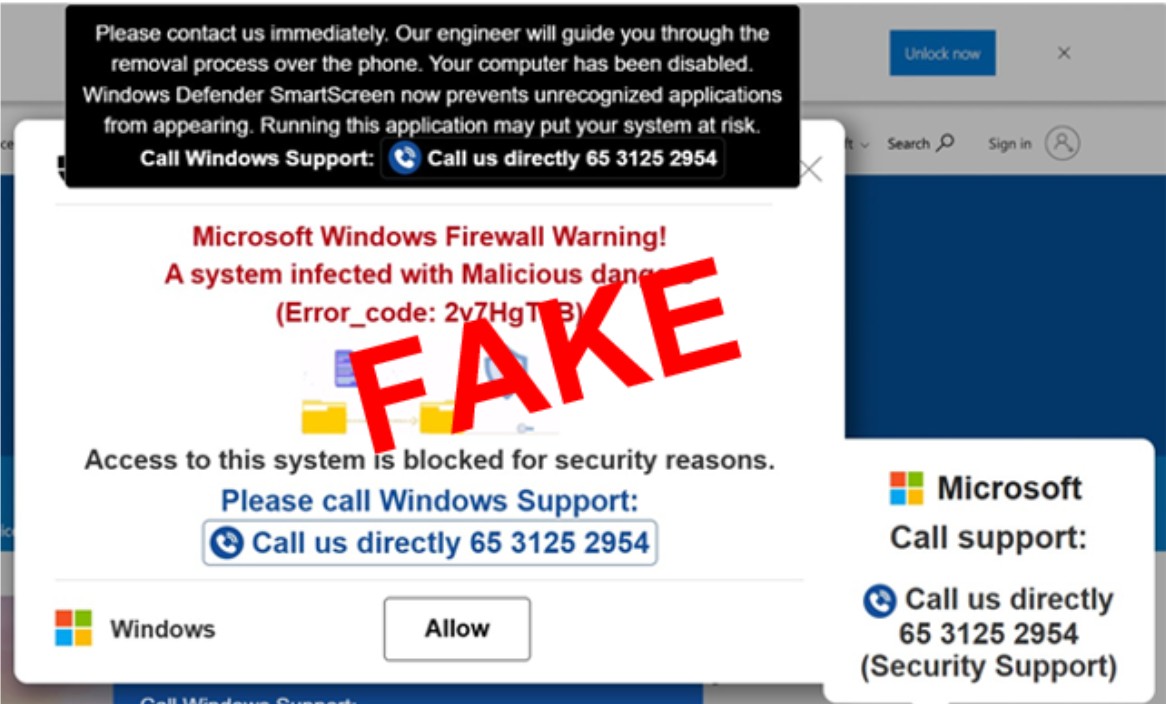
Step 1: A pop-up alert appears on your screen. It claims your device has been hacked. It displays a phone number and tells you to call Microsoft technical support.
Step 2: You call the number. You are transferred to a second person who claims to be a police officer. You are told your device was used for illegal activities such as money laundering.
Step 3: You are pressured to transfer money or hand over your banking log-in details. You may also be asked to let the caller control your device remotely. Once you do, scammers can access your bank account directly. Victims only discovered the scam after unauthorised transactions appeared.
🚩 Microsoft does not include phone numbers in its error or warning messages. Any pop-up that tells you to call a number is a scam.
Tips to protect yourself:
Do not call any number shown in a pop-up. Close it by closing your internet browser. If you cannot close it, turn off your device completely.
Never let anyone take control of your device remotely. Once a scammer has access, they can empty your bank account within minutes.
If you have already been affected, turn off your device immediately. Contact your bank to stop all transactions.
If you have already transferred money or shared your banking details, file a police report immediately at https://www.police.gov.sg/E-Services/Lodge-Police-Report. The sooner you report, the higher the chance of recovering your money.
Download the ScamShield app to block scam calls and filter scam SMSes. Use it to verify suspicious messages and contact details before responding.
Report what you see. If you come across a suspicious pop-up, phone number, or website link, report it to us via the ScamShield app.
For more information on scams, visit www.scamshield.gov.sg or call the 24/7 ScamShield Helpline at 1799.
Screenshot of the pop-up alert:
Related questions
Seeing a Microsoft or Crypto.com support alert on your screen? Here's how to tell if it's a scam
Scammers are targeting senior citizens with social activities that don't exist. Here's how you can spot one.
scamshield
40
40
Can I check or report scams I received on other messaging platforms such as WeChat, Line, etc?
scamshield
3
3
What are Scam Trend Alerts?
scamshield
Need more help?
Describe your issues to us.