
scamshield
60
A Singapore Government Agency Website
Back to home
Updated by SCAMSHIELD 14 found this helpful
Received an email from the “Ministry of Manpower”? Here’s how to tell if it’s a scam
If you have any feedback for us regarding our Scam Trend Alerts (BETA) feature or about this article, please write to us here.
If you want to know how to set up scam alerts on your ScamShield app, please refer to this guide.
NOTE: This is a beta feature being rolled out to a small group of users first, so not everyone will see it yet.
There has been a recent rise in scam involving emails and fake websites that impersonate the Ministry of Manpower (MOM). In April 2026 alone, the Singapore Police Force (SPF) proactively detected and blocked at least 10 malicious websites used in this scam. Recipients are tricked into downloading malware disguised as "rectification documents", giving scammers remote access to their devices.
Knowing what to look out for will help you stay protected.
How this scam works:
This scam starts with an official-looking email and ends with malware silently installed on your device. Be alert to the following:
Step 1: You receive an email appearing to be from MOM. The email claims that your company has violated the Employment Act and instructs you to review "rectification documents" by clicking a link.
Step 2: You are directed to a fake MOM webpage. A link leads you to a website designed to closely resemble an official MOM page.
Step 3: You are prompted to download a compressed file. The file is presented as the "rectification documents" your company needs to review.
Step 4: Malware is installed on your device. Opening the file installs malware that allows scammers to gain unauthorised remote access to your device, along with any sensitive information stored on it.
🚩 MOM officers will never email you a link to download files or rectify alleged offences. Any official notice from MOM will come through verified government channels.
Tips to protect yourself:
Do not click links in unsolicited emails. If an email claims to be from a government agency, verify it through the agency's official website or contact number before taking any action.
Do not download files from unfamiliar or unverified sources. Compressed files (such as .zip files) from unexpected emails are a common way for malware to spread.
Know what MOM officers will never ask you to do. No MOM officer will ever ask you to transfer money, disclose your bank login details, install apps from unofficial app stores, or transfer your call to the Police.
Keep your devices secure. Ensure your computer's security software is updated regularly. For guidance on anti-virus software and device security, visit the Cyber Security Agency of Singapore at csa.gov.sg.
Tell the authorities immediately if you suspect your device has been compromised. Disconnect the device from the internet, run a full anti-virus scan, and make a police report.
If you receive emails of this nature, you may report it via the ScamShield app.
For more information on scams, visit www.scamshield.gov.sg or call the 24/7 ScamShield Helpline at 1799.
Examples of such scam emails:
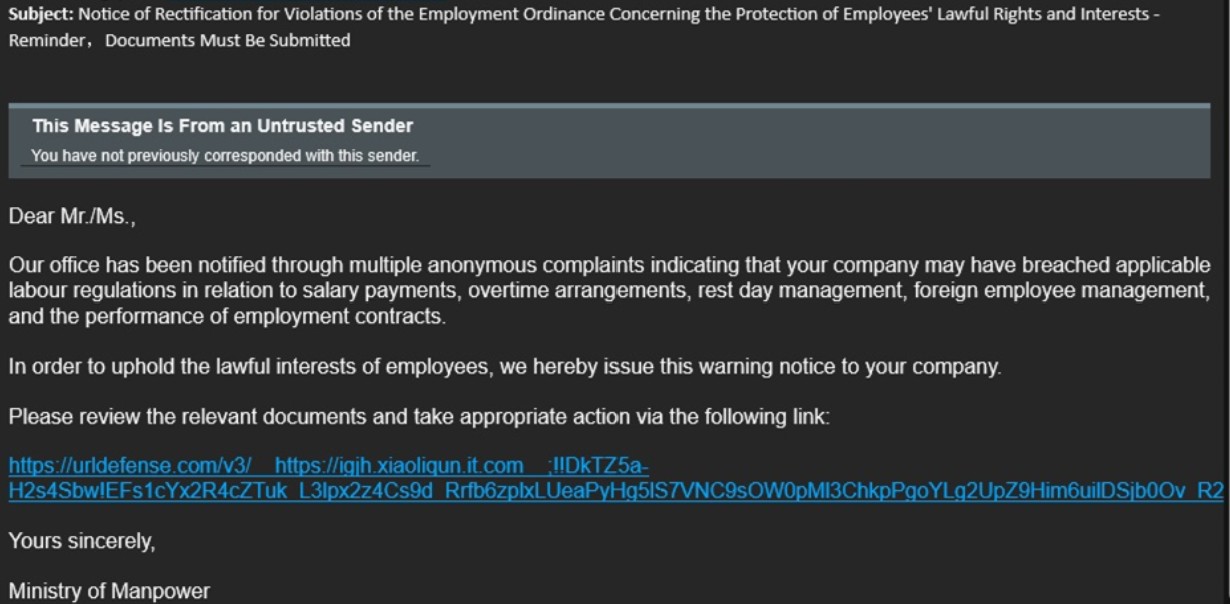 Screenshot of an MOM impersonation email
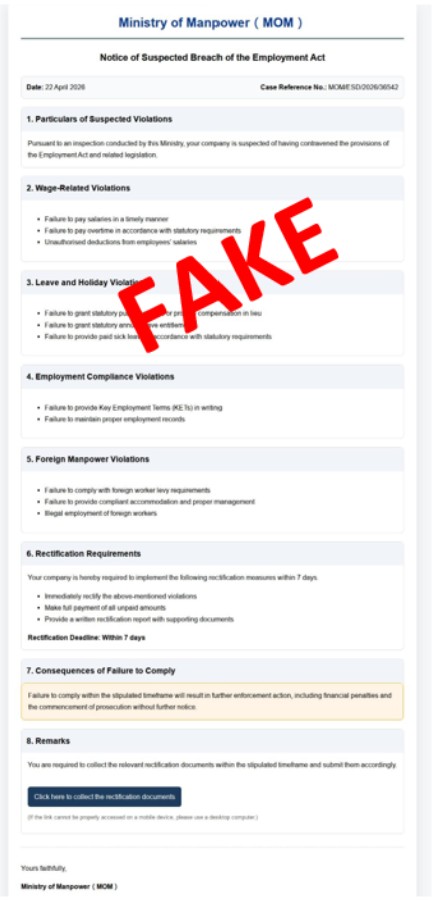 Screenshot of a website impersonating MOM
Related questions


Need more help?
Describe your issues to us.