
ourmarriagejourney
1
A Singapore Government Agency Website
Back to home
Updated by OURMARRIAGEJOURNEY
How do I change my solemnisation details after I have filed my marriage application?
If you wish to make to any changes to your solemnisation details, you are required to log into your marriage dashboard and change it online. You will need your Singpass to assess the dashboard. You will need to log in at www.marriage.gov.sg by clicking on the login button at the top right hand corner of the page. Once logged in, you will be able to see your dashboard (see screen capture below).
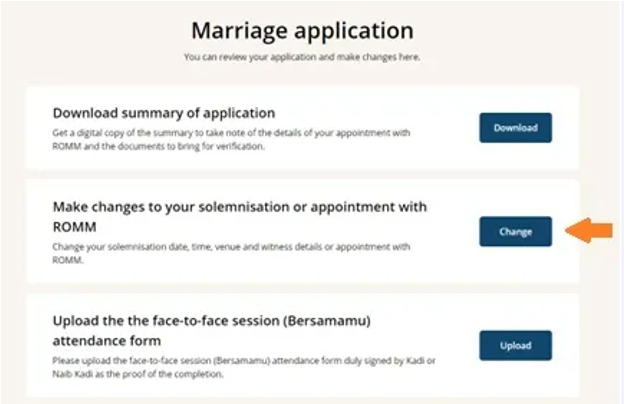
You can click on the change button to make changes to your solemnisation details. A standard fee of $15.00 is payable before each application for change, regardless of the number of items/details changed on a per transaction basis using credit/debit card.
If there are changes in the solemnisation details on the day of solemnisation, you will not be issued with the marriage certificate. The Kadi/Naib Kadi will return the marriage certificate to the ROMM for amendment(s).
You are required to come to ROMM in person to make and pay for the changes before you can collect the marriage certificate. Please note that your marriage will not be registered until the changes are made to your solemnisation details. This would impact on your marital status on MyInfo.
Related questions
When can I make changes to my solemnisation details?
How much do I need to pay to make changes to my solemnisation details?
ourmarriagejourney
What details can I change in my marriage application after successful application?
ourmarriagejourney
After submitting our marriage application, what should we do if we need to make changes to the solemnisation details such as the solemniser, venue, witnesses, date or time?
ourmarriagejourney
Need more help?
Describe your issues to us.