
kampungspirit
A Singapore Government Agency Website
Back to home
Updated by KAMPUNGSPIRIT
I cannot download my publicity card from the IPC Publicity Generator. What should I do?
There are two common causes. Both are checks the generator runs so the card stays readable, especially on mobile.
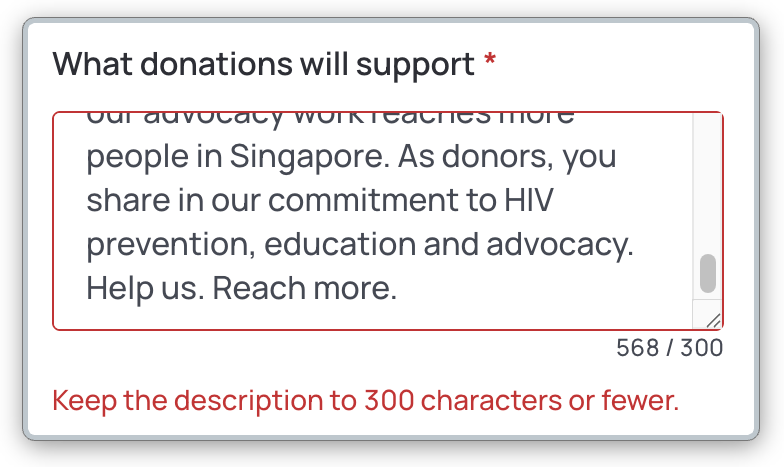
If the “What donations will support” text is longer than 300 characters
Open the IPC Publicity Generator and select your IPC name.
Rephrase the text so it fits within 300 characters. A character count is shown under the field. This changes the text on the card only, not on your IPC page.
Download the card again.
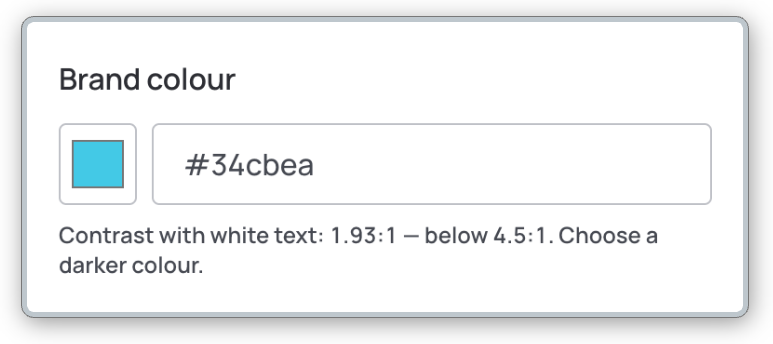
If the background colour doesn't pass contrast ratio checks
Choose a darker background colour. The text on the card is white, so a light background makes it hard to read. The generator shows a warning when the colour is too light.
Download the card again.
 If it still does not download, try another browser, and check that your browser is not blocking downloads or pop-ups.
Need help?
Submit the KampungSpirit feedback form with your IPC name, and a screenshot of what you see.
Related questions
Need more help?
Describe your issues to us.