
help
A Singapore Government Agency Website
Back to home
Updated by HELP
How to update your logo and agency name?
Your agency name and logo appear at the top of your help centre. You can change either at any time. Keep note that only site owners can make these changes.
Step 1: Go to your Admin Studio and log in.
Step 2: Go to Settings, Helpcenter Admin.
Step 3: To upload or change your logo, under BRANDING click the edit button on your logo box. We recommend using a logo with a transparent background (e.g. PNG) so it displays cleanly against your site.
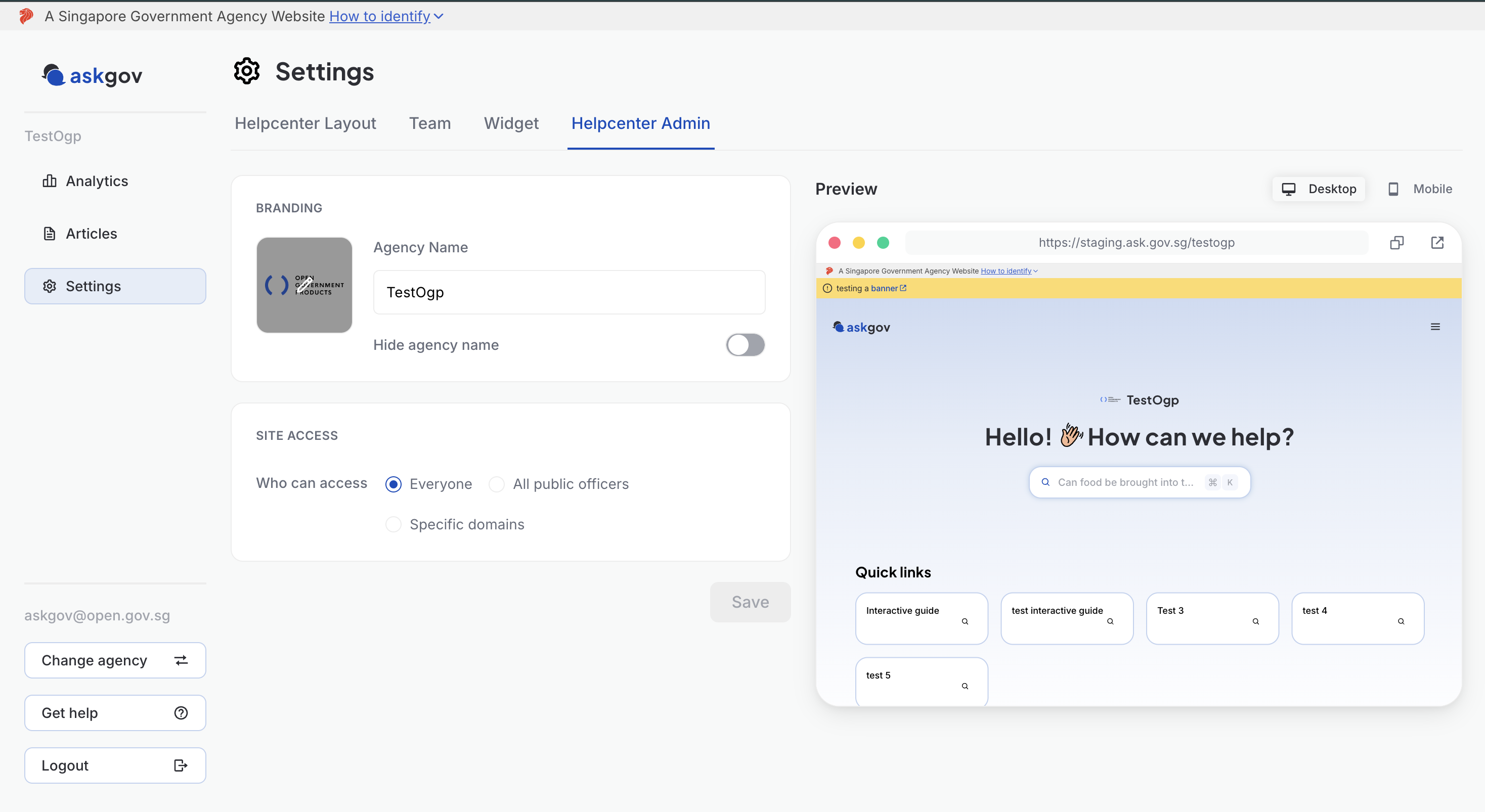
Step 4: Edit the Agency Name field to change the name shown on your site.
Step 5: Toggle Hide agency name on if you'd rather show only your logo, without the agency name text next to it.
Step 6: Click Save.
💡 Tip: As you make changes, the Preview panel on the right updates to show how your site will actually look — use the Desktop / Mobile toggle above it to check both views before saving.
Topics:
Site SettingsRelated questions
Need more help?
Describe your issues to us.