
help
5
A Singapore Government Agency Website
Back to home
Updated by HELP
How to manage your AskGov widget?
What is the AskGov widget?
The AskGov widget is a tool that you can implement on your agency website, to help visitors quickly find answers to their questions. It will appear on the bottom right of the agency website.
Upon clicking into it, visitors will see the top frequently asked questions. They can also enter in their own search terms to find relevant questions.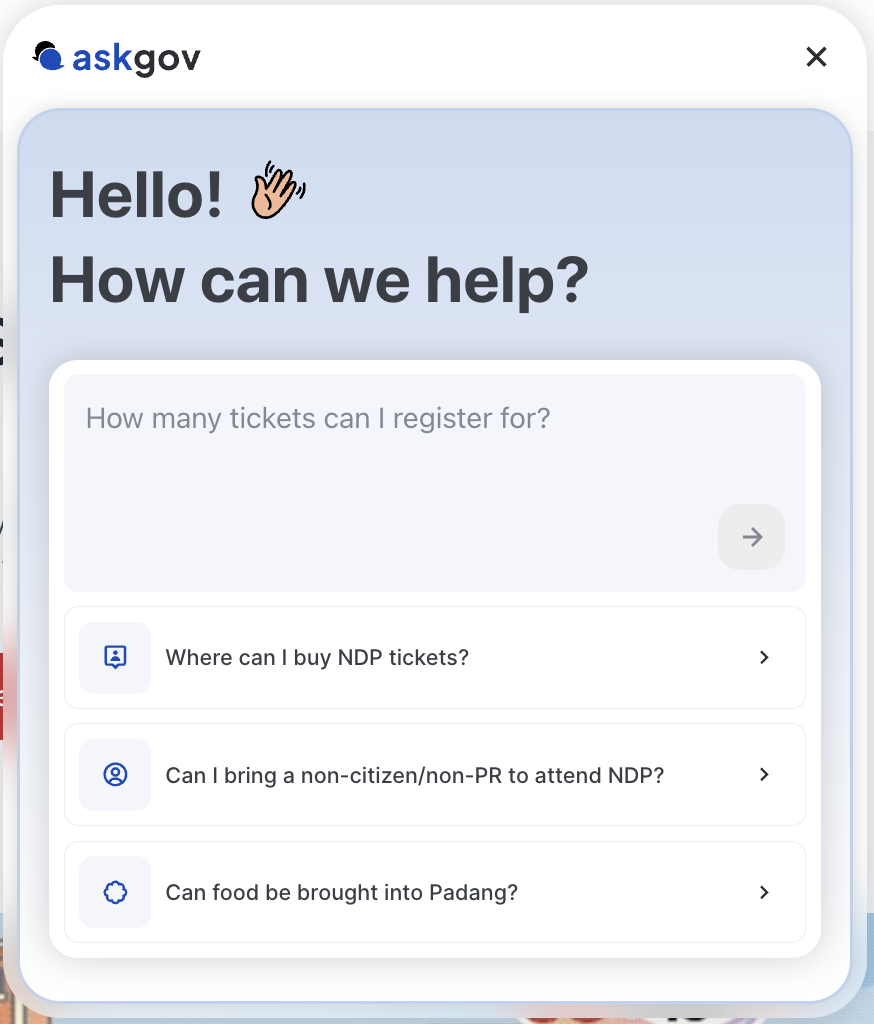
These articles are the same as those you've set up on your agency's AskGov site.
How to set up the widget on your website
Refer to this article here
How to manage your widget settings
Once your widget is installed, you can manage its settings yourself in Admin Studio — no need to email the AskGov team. Keep note that only site owners can make these changes.
Step 1: Go to your Admin Studio and log in
Step 2: Go to Settings, Widget.
Step 3: Choose the Isomer sites or Non-Isomer sites tab, depending on how your website is hosted.
Step 4: If your site is on Isomer, share your agency code (shown on this page) with the Isomer Ops Team so they can complete the install on their end.
Step 5: Under General > Placeholder, edit the placeholder text shown in the widget's search bar.
Step 6: Under Quick Links, add up to 3 quick links for the widget — set up the same way as your help centre's quick links, but limited to 3 instead of 8.
Step 7: Click Save.
Step 8: To preview your changes, open the chat bubble icon in the bottom-right corner of your own site.
Topics:
Site SettingsRelated questions
Need more help?
Describe your issues to us.