
singpass
23215
A Singapore Government Agency Website
Back to home
Updated by SINGPASS 3,694 found this helpful
Why am I being asked to renew or confirm my device?
From time to time, Singpass asks you to confirm that this phone is still yours, so you can keep using it to log in and carry out your transactions safely.
Depending on your app version, you'll see one of two screens. Both do the same thing.
If you see Continue trusting this device for Singpass? (app version 26.2 and above)
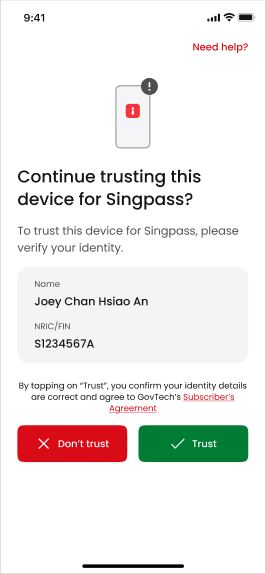
Check that your details are correct and tap Trust.
If you see Renew your certificate (app version 26.1 and below)
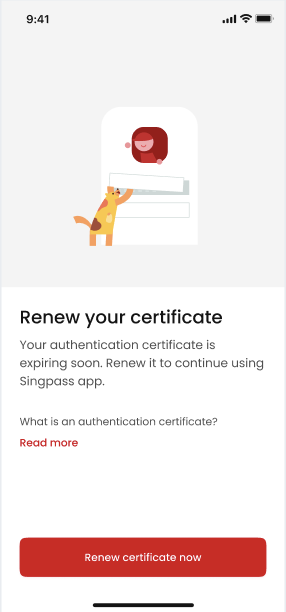 Tap Renew certificate now and follow the steps. To get the newer, simpler version of this screen, update your Singpass app to the latest version.
Why am I seeing this?
This appears for one of two reasons:
Routine annual security check - a standard check to keep your account safe.
Personal details update - if your details, such as your name or address, have recently changed, we ask you to confirm them.
How often will I be reminded?
If your confirmation is coming due, you'll receive reminders at 30, 10, 3, and 1 day before. If you haven't opened the app or acted on an earlier reminder, we'll send it again so you don't miss it.
Is something wrong with my account?
No, seeing these screens is not a sign of a compromised account. This is a normal, routine verification process to ensure your Singpass remains secure. This is a normal part of keeping Singpass secure.
What happens after I confirm?
Your phone stays trusted, so you can continue logging in with your fingerprint, face, or passcode as usual.
If you need further help, please contact the Singpass Helpdesk.
Related questions
What is an authentication certificate?
Why have I not received a prompt to renew my authentication certificate when other Singpass users have received one?
singpass
1088
1088
Why am I being prompted to renew my signing certificate?
singpass
512
512
How can I be sure that my personal data remains secure during the transaction?
singpass
16
16
Need more help?
Describe your issues to us.