
parkingsg
A Singapore Government Agency Website
Back to home
Updated by PARKINGSG 10 found this helpful
Why do I see a duplicate charge for a parking.sg session, or a charge for a session I don't recognise?
You have not been double charged. What you're seeing is how ParkingSG bills for parking.
ParkingSG consolidates multiple parking sessions into a single charge through an automatic process called batching. Because of this, it is normal to see:
A charge or bank SMS alert on a day you did not drive or park
Two charges that look like payment for the same session
A charged amount that is larger than any single parking session
The two charges you may see
PARKING.SG PENDING — appears immediately when you start a parking session. This is a temporary hold, not a finalised charge. Nothing has been billed to you yet.
PARKING.SG BILL_XXXXXXX — your actual, finalised charge. It is issued once your parking total reaches $5, or 2 days after your session, whichever comes first. This is why it often lands on a day you didn't park, and why the amount may cover several sessions combined.
Once the bill is issued, the earlier pending charge is automatically dropped or refunded — you will not be charged twice.
Both charges may show for up to a week — this is normal
Banks take different amounts of time to remove the pending charge. If you check your statement right after receiving a bill, you may still see both the pending amount and the final bill. Allow up to a week before treating this as a discrepancy. Processing time varies across banks.
How to check what a charge was for
Open the ParkingSG app on the phone you used to pay — parking records are stored only on that device.
Go to Menu (☰) > History > Bills.
Match the Bill ID (e.g. BILL_EFB85F) against the description on your bank statement. Tap a bill to see the individual parking sessions it covers.
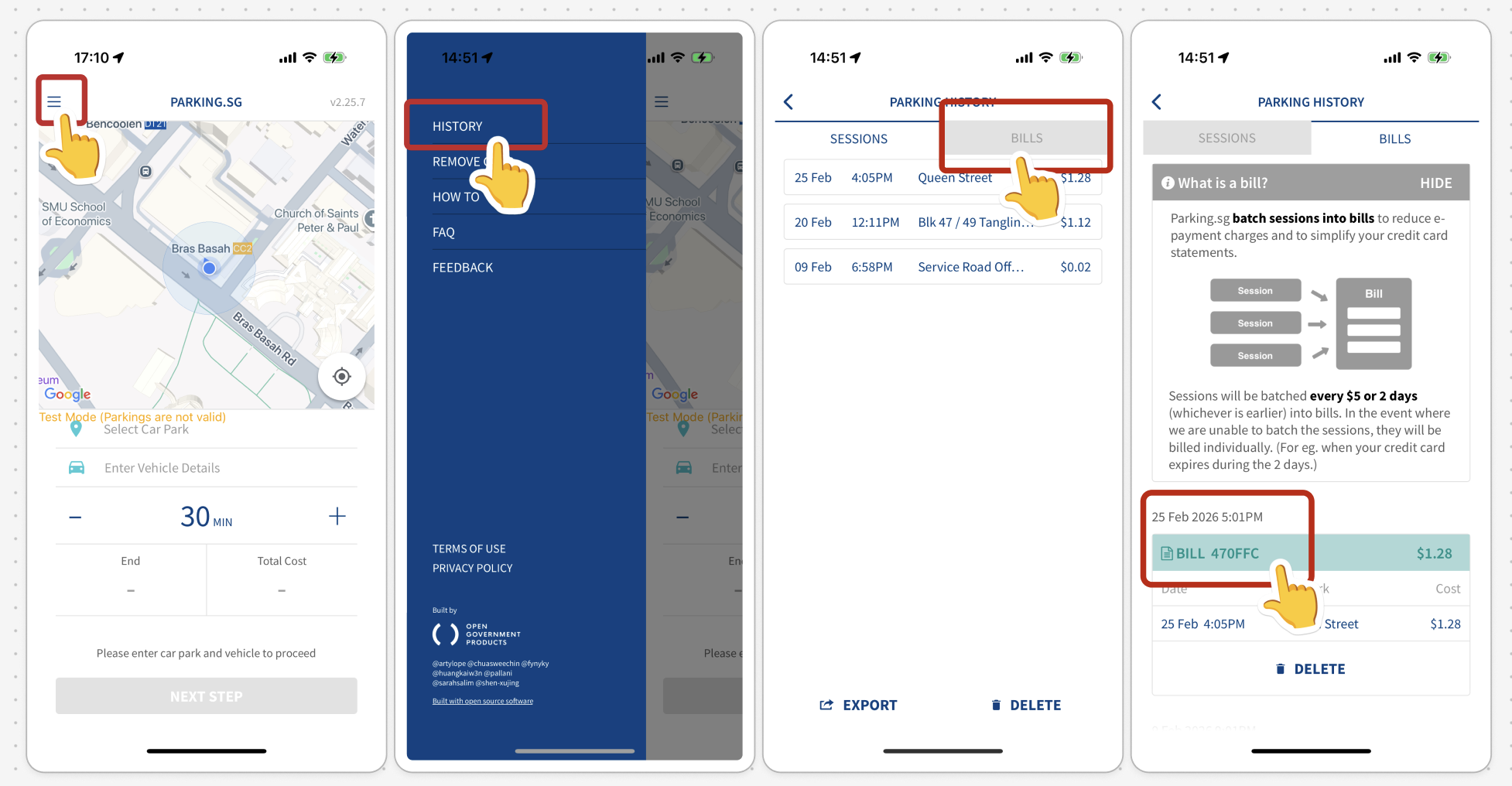

Tip: Bank SMS alerts often cut off the transaction description, so the Bill ID in the SMS may appear incomplete. Match against your full bank statement or the app instead.
For a visual walkthrough, see: https://www.parking.sg/visual-help-guides/batching
Related questions
My parking session has ended and I've been charged. Why is the Parking.sg – PENDING charge still showing on my bank statement?
Why do I have multiple Parking.sg - PENDING charges for a single parking session?
parkingsg
How do I verify my parking sessions against my bank statement?
parkingsg
Can I check which vehicle the parking fees were billed to?
parkingsg
Need more help?
Describe your issues to us.