
healthiersg
1
A Singapore Government Agency Website
Back to home
Updated by HEALTHIERSG
How do I view my exercise and diet recommendations in Health Plan?
At your Health Plan main page, under “Your Recommended Action” section, tap on your task card labelled “Get active and eat healthy”. You will be able to view the lifestyle and diet recommendations that your doctor selected specifically for you.
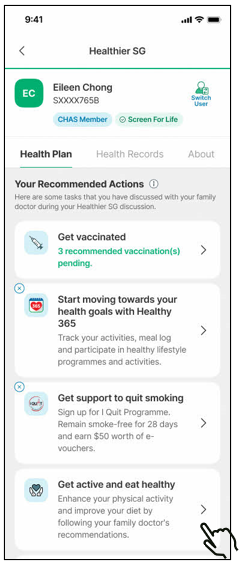
Depending on what your doctor recommends, these could include aerobics exercises at a level of intensity that is suitable for you, or exercises to work on your strength, balance or flexibility. It could also be on tips to manage your diet intake (i.e. sodium, sugar, saturated fats, carbohydrate, fibre, protein and calories). Each recommendation comes with curated actionable examples and additional resources for those who want more information.
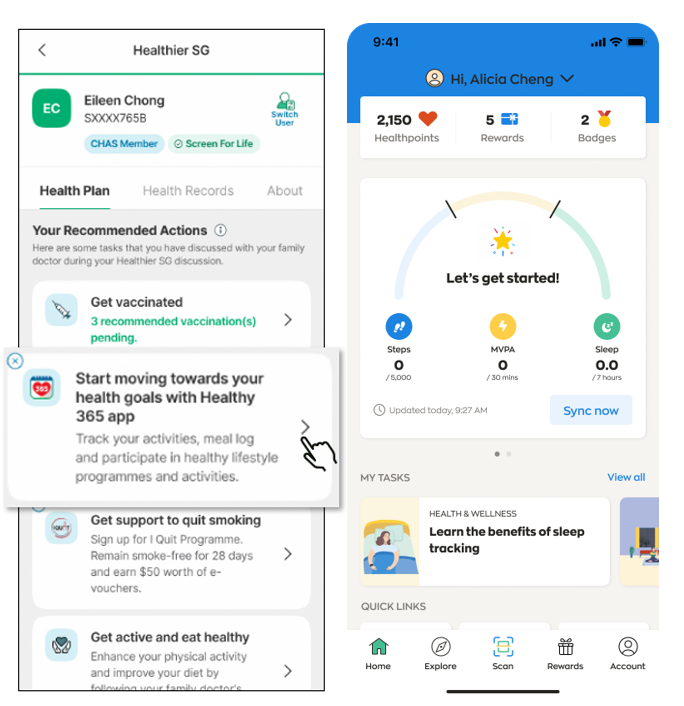
For recommended health programmes offered by community partners, you may use the direct link function within your Health Plan to access Healthy 365 app conveniently under “Your Recommended Actions” or “Tools” sections and see activities near you. Alternatively, you may download the Healthy 365 app from your app store.
Related questions
My doctor has recommended me to go for a Healthier SG vaccination. How do I follow up with this task to make a vaccination appointment in my Health Plan?
How do I view my Health Plan and the tasks that my doctor has recommended me to do in the HealthHub app?
healthiersg
1
1
How do I sign up for the recommended exercise programmes that are in my exercise plan generated by Health Plan AI?
healthiersg
How do I view the programmes referred/recommended for me by my doctor in Health Plan?
healthiersg
Need more help?
Describe your issues to us.